Using it · page 22 of 29
Security: evidence and proof
In 30 seconds
- What DoneMark does: reads the report your own scanners published at the pull request's commit and shows it in the Security square. The seal keeps what they said, under a fingerprint.
- It does not scan or make your app secure: your CI runs the scanners. The square never blocks anything; a person decides. DoneMark is not certified.
- You do: nothing, for an app made from a DoneMark template. On a repository whose pull requests you judge, press Copy the job on the first grey Security square and paste it into a workflow that runs on pull requests.
DoneMark does not make your app secure, and it does not scan it. It gives a security review the two things it asks for in writing. It puts what your own scanners found beside every sign-off. And it keeps who signed off, on what commit and why, in a record nobody can change afterwards.
This page says what that evidence is, how to get it on your pull requests, and how to hand it to someone who asks for it.
In one breath
- Your CI runs the scanners. DoneMark reads their report at the pull request's own commit and shows it in the Security square.
- A person signs off, with their name and a reason. The seal keeps what the scanners said at that moment, word for word, under a fingerprint.
- Agents work inside recorded bounds. They never change your CI, and their keys stay in your GitHub secrets.
- Risky work waits for two named approvals: payments, sign-in, personal data and deleting data.
- A later change cannot quietly undo an earlier one. When it breaks the test behind a signed-off line, the judge is asked about that line by name.
- The record is yours. It exports as one file, and anyone holding that file can check a seal's fingerprint.
The Security square
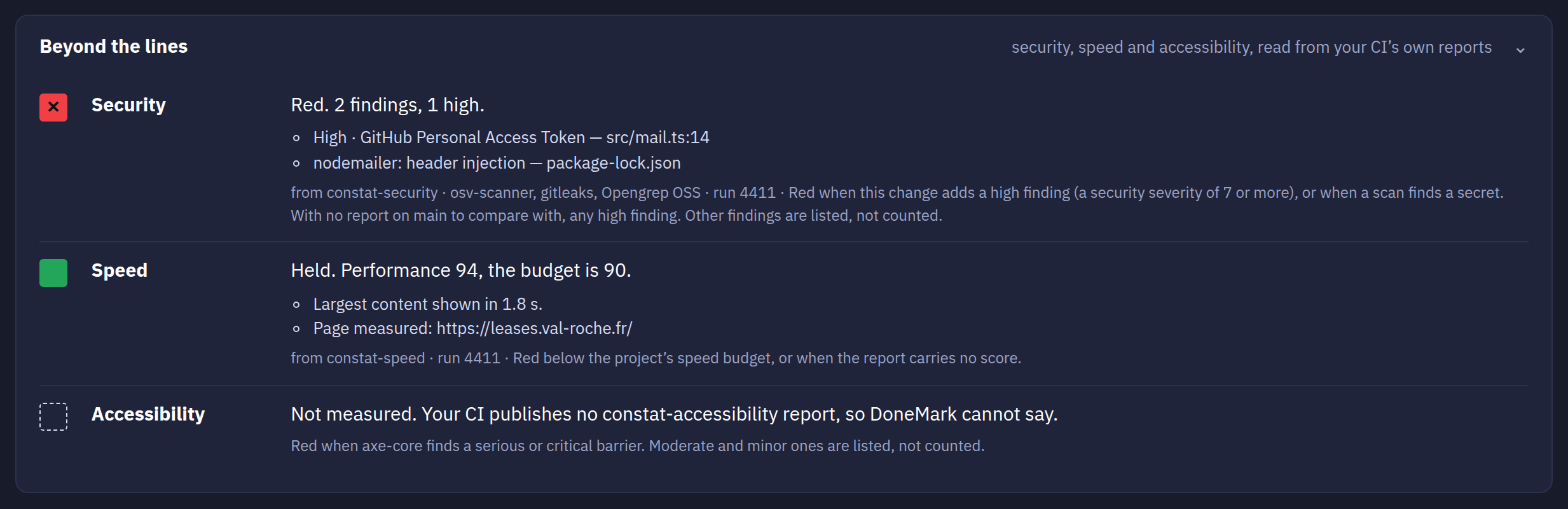
The run page shows three squares about the whole attempt, beside the four on every line: Security, Speed and Accessibility. The Security square is read from one report your CI publishes, and it reads three kinds of finding.
| Scanner | What it looks for | Version | Turns the square red |
|---|---|---|---|
| osv-scanner | a package in your lockfiles with a known flaw | 2.6.0 | a security severity of 7 or more, added by the change |
| gitleaks | text shaped like a key, a token or a password, in the files of the commit | 8.21.2 | any secret |
| Opengrep, with DoneMark's own rules | code built in a way that lets outside text do harm | 1.31.0 | a rule of severity 7 or more, added by the change |
Until 21 October 2026 the job pinned osv-scanner 1.9.2, which wrote no severity into its report. Package flaws were listed, but none was ever counted as high, however serious. Template 74 pins 2.6.0, which writes it.
All three run in one job, inside your CI, on your runner. The job never fails your CI. It uploads one report, in the SARIF format, as the artifact named constat-security. DoneMark reads it from any completed run at the attempt's commit.
The square says one of three things:
- Red: a finding of severity 7 or more that the change added, or a secret. When main has no report to compare with, any finding of severity 7 or more.
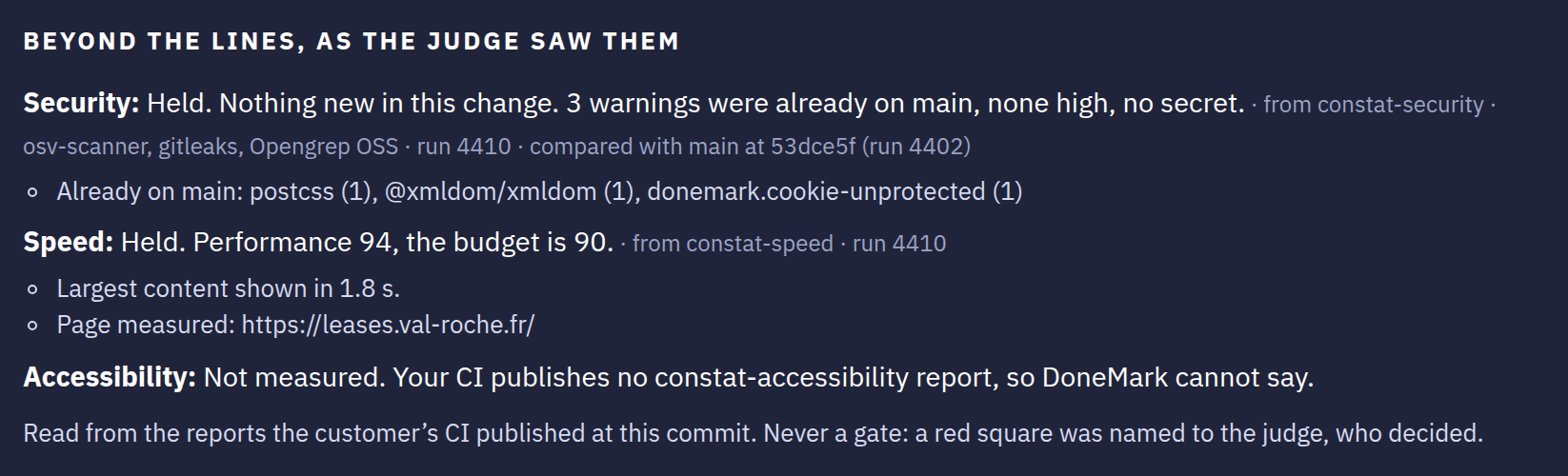
- Held: the report was read, and the change added nothing high and no secret. Lesser findings, and high ones main already carried, are listed under it.
- Grey, not measured: your CI published no security report at that commit.
The square never blocks anything. A red square is named in the question DoneMark asks for your reason, and you decide.
What attackers are using now
Most known flaws are never used in an attack. The US agency CISA keeps the public list of the ones that are, its catalogue of Known Exploited Vulnerabilities. DoneMark reads it, at most twice a day. When a finding's CVE is on it, the finding goes first in the square, marked Attackers are using this now, and the square's sentence counts it. The mark does not change what turns the square red.
New in this change, or already on main
When main's own run at the commit the change started from also published a security report, DoneMark compares the two. The square then says what this change added, apart from what main already carried:
Held. Nothing new in this change. 40 warnings were already on main, none high, no secret.
New findings are listed first. The square names the commit and the run it compared with. A high finding main already carried is counted in the sentence, "13 high already on main", and does not turn the square red: the change did not add it. When main has no report at that commit, the findings are listed without that split, and any high finding turns the square red.
DoneMark's own rules
The code rules are written by DoneMark, kept in your repository under .constat/security-rules/, and open for you to read. The pinned scanner runs them; DoneMark never runs them itself.
For JavaScript and TypeScript:
donemark.shell-from-input: a shell command built from outside text, severity 8.5.donemark.query-from-input: a database query built from outside text, severity 8.0.donemark.eval: code run from a string, severity 8.0.donemark.path-from-input: a file path built from outside text, severity 7.5.donemark.jwt-none: a token accepted with no signature algorithm, severity 7.5.donemark.tls-check-off: certificate checking switched off, severity 7.0.donemark.html-from-input: HTML inserted into the page without escaping, severity 6.0.donemark.weak-randomness-for-secrets: a secret, token or password made withMath.random, severity 6.0.donemark.weak-hash-for-passwords: passwords hashed with MD5 or SHA-1, severity 6.0.donemark.redirect-from-input: a redirect sent where outside text says, severity 5.5.donemark.regex-from-input: a regular expression built from outside text, severity 5.0.donemark.cookie-unprotected: a cookie set withouthttpOnlyorsecure, severity 5.0.
For Elixir:
donemark.elixir.code-eval: code run from a string, severity 8.5.donemark.elixir.shell-from-input: a shell command built from outside text, severity 8.5.donemark.elixir.query-from-input: a database query built from outside text, severity 8.0.donemark.elixir.binary-to-term: outside data turned back into terms without the safe option, severity 7.5.donemark.elixir.raw-html: HTML rendered without escaping, severity 6.0.donemark.elixir.atom-from-input: an atom made from outside text, severity 5.5.
These rules catch common mistakes. They are not a full code review, and a held square does not mean the code has no flaw.
Getting the evidence on your pull requests
Which case you are in decides what you do.
| Your project | What to do |
|---|---|
| An app made from a DoneMark template | Nothing. Its CI already runs the job and carries the rules. |
| A project whose CI DoneMark set up | Nothing. The job is in constat-ci.yml, and the rules arrive with its next update. |
| A repository whose pull requests you judge | On the first grey Security square, press Copy the job, and paste it into any workflow that runs on pull requests. |
| Your CI already runs a scanner | Upload its SARIF report under the name constat-security. |
The pasted job runs the two package and secret scanners. It also runs the code rules whenever the repository holds .constat/security-rules/.
If you already run CodeQL, Semgrep, Snyk, Trivy or another SARIF scanner, one step is enough. DoneMark reads the rule, its severity and the file and line, whatever tool wrote them:
- uses: actions/upload-artifact@v4
  if: always()
  with:
    name: constat-security
    path: path/to/your-report.sarif
What the seal keeps
When you press Looks right or Not quite, DoneMark seals a record of what you saw. For security, it keeps:
- The squares as you saw them, under Beyond the lines, on every seal and in DoneMark's check on the pull request, red or not.
- For each finding: the rule, its description, its severity, and the file and line. Never the matched text, so a secret a scanner found can never land in a sealed record. gitleaks itself runs with
--redact. - DoneMark's own copy. GitHub deletes artifacts and logs after a while; the seal keeps what it read, and its page shows that copy.
- Your name, your reason, and the question DoneMark asked for it. When the judge is also the person the work came from, the seal says so in one line.
- What kind of change it was, and your tick when the change touched how it is measured.
- The bounds the attempt ran under: the files it was allowed to change, its budget and its time limit.
A seal is never edited. A later verdict on the same ask is sealed as its own record, beside the first. A Not quite takes no number, so a DoneMark number always means somebody accepted the work.
A person decides, on the record
- Only a judge of the project may sign. See People, seats and invitations.
- The change's riskiest files come first. Under What kind of change, files about sign-in, payments, secrets, the database and how it is measured show in orange. DoneMark sorts them by name alone and never blocks on them.
- A change to how it is measured asks for your tick. When the change touches the CI workflows, the report scripts or the test settings, a check can pass because it was made easier to pass. Looks right opens only after you tick that you looked at those files.
- Risky work waits for two named approvals. DoneMark suggests the mark from the ask's words; a person decides it. A risky ask needs a short safety note, approved by name before any attempt starts, and every attempt is handed that note as a rule it may not break. Going live then needs a second approval, by someone other than the judge. When nobody else on the project may approve, the record says so.
- The seal can gate the merge. With The seal gates the merge on in Settings, a Not quite fails DoneMark's check on the pull request. It is off by default.
Agents stay inside the lines
- Agents run in your CI, with your key, on your runner or on a machine of your own. DoneMark never runs your code.
- Keys stay in GitHub. When you give DoneMark a key, your browser seals it before it leaves the page, and GitHub keeps it as a secret of your repository. DoneMark records its name, never its value.
- An agent never changes your CI. If an attempt changes a file under
.github/workflows/, the runner puts that file back before pushing, and the ask says CI left as it was. Changing the CI stays a person's call. - What an agent says is kept apart from what was seen. Its claims are on the record, but they never count as evidence.
When a later change undoes an earlier promise
A security rule written as a line of done when keeps working after the seal. For example:
Someone who is not signed in cannot open the admin page.
Seen by a check named after it, that line is watched on every later pull request. If one of them makes that test fail, rewrites it or leaves it out, the door adds a step, From an earlier seal, naming the line, its ask and who signed it. A rewritten test shows its changed lines. You answer Yes, this ask replaces it or No, it broke, and nothing is signed until you do.
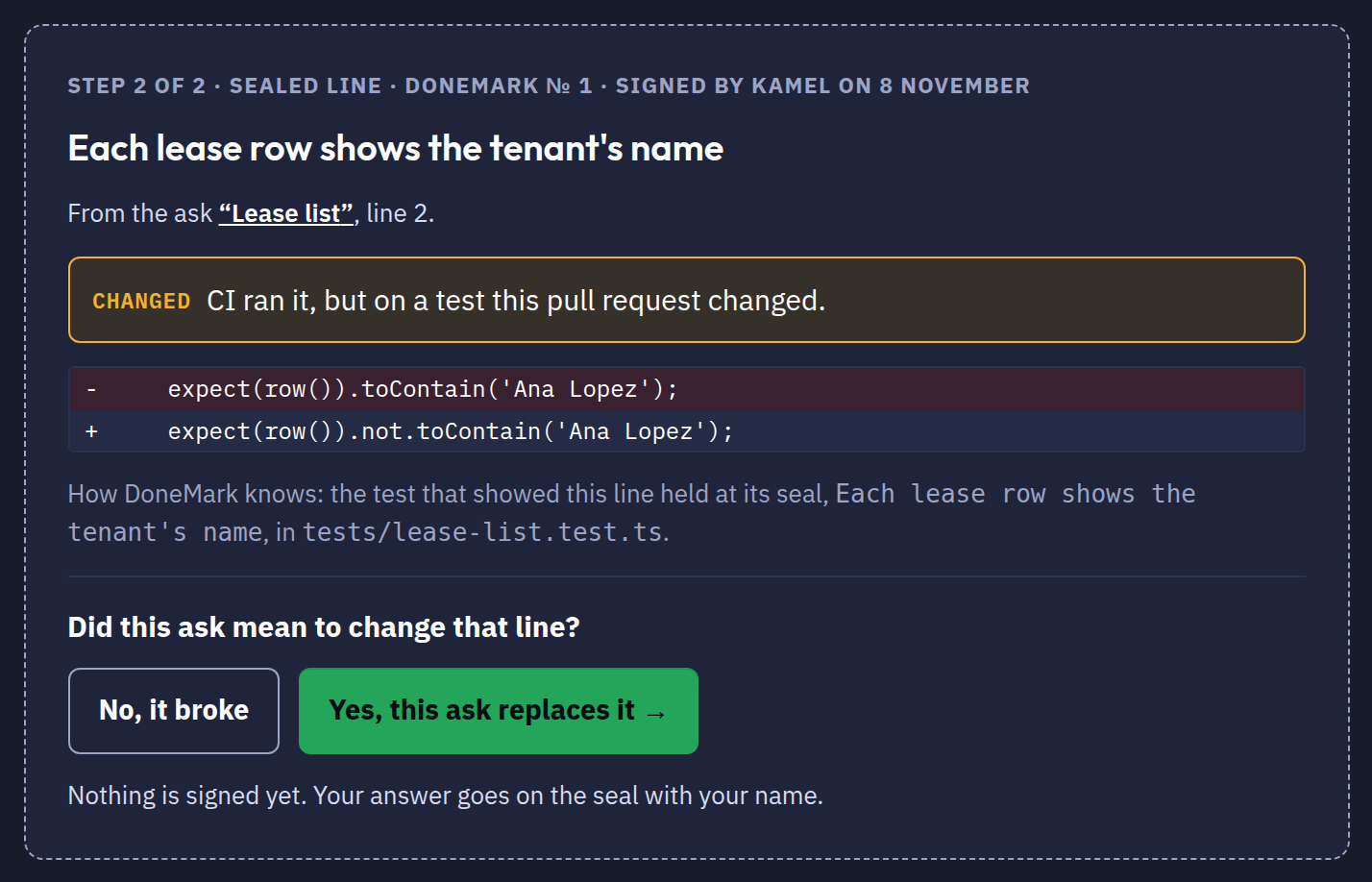
Your answer goes on the new seal. The old seal is untouched, and its line gets a dated note. A line that was replaced is no longer watched. A test that was already failing on main is not asked about.
So write the security rules you care about as lines of done when, seen by a check. They become promises DoneMark keeps an eye on.
What DoneMark can see, and what it keeps
On GitHub. The DoneMark witness App reads contents, Actions runs and artifacts, checks, pull requests and their files, and secret names. It may start and cancel runs of your own workflows. It never reads a secret's value, writes a file, pushes a commit or merges. It writes on two things only when you allow it: its own check run, and its own comment. You choose which repositories it sees, and you can remove it from GitHub at any time.
When you sign in. DoneMark asks GitHub for your name and email. Your GitHub token is used once, to learn who you are, and is not stored.
Between organisations. Every table of the record is fenced by the database itself, with row-level security. A request for one organisation cannot read another organisation's rows, whatever the code above it asks.
Where it lives. OVHcloud hosts DoneMark's servers and backups, in France.
Public lists. To mark what attackers are using, DoneMark's server fetches CISA's public catalogue from cisa.gov. Nothing about you or your code is sent.
AI providers. Only when drafting is on. To draft done when lines or a mockup, DoneMark sends the words of the ask to the provider your organisation chose: for a pull request, its title and description. An administrator can turn drafting off. Your code, your pull requests and your CI output are never used to train AI models.
Leaving. Export the record gives an administrator one JSON file with every table your organisation holds. Columns holding a token, a secret, a key or a webhook are left out. Delete this organisation erases its records 30 days later.
Checking a seal yourself
Every sealed record carries a fingerprint: sha256 over the sealed body, written with its keys in sorted order and no spaces. If one character of the sealed evidence changed, the fingerprint would not match.

You can check it without asking DoneMark. Export the record, find the seal in the constats table, and hash its body. With jq, for № 4 of one project:
seal='.tables.constats[] | select(.project_id == "PROJECT_ID" and .number == 4)'
jq -j "$seal | .body" record.json | shasum -a 256
jq -r "$seal | .body_sha256" record.json
The first answer must equal the second, and the fingerprint printed at the foot of the record's page.
Handing it to a reviewer
A client, an auditor or your own security lead will ask questions like these. The record answers each one.
Export for an auditor. On About, the Register tab offers a pack for one project between two days you choose. It downloads as one .tar.gz file holding:
- every record sealed between those days;
- the evidence each one was judged on, with every earlier version of it;
- the agent's claims and the attempt's activity;
- the pictures the judge looked at;
- who could act on the project, as that changed;
- a manifest with a
sha256of each file, and a list of anything left out, with the reason.
The same range gives the same file. The organisation's administrators and the project's judges may download it.
| They ask | Where the record answers |
|---|---|
| Who approved this change, and when? | The seal: the judge's name, the time, the reason. |
| Was it looked at by someone other than its author? | The seal says so when judge and author are the same person. Risky work needs a second approver. |
| Was it tested before it went out? | The four squares on each line, read from your CI at the change's own commit. |
| Were dependencies and secrets checked? | The Security square on the seal, with the scanner, the commit and the findings. |
| Did this change add a known flaw? | The findings marked new in this change, apart from what main already carried. |
| Could the evidence have been edited since? | The fingerprint on each seal, and the pack's manifest, which fingerprints every file. |
| Could an agent have weakened the checks? | CI left as it was on the ask, and the tick on how it is measured. |
DoneMark is not certified, and using it does not make you compliant with any standard. Reviews of change management, such as SOC 2 or ISO 27001 audits, ask who approved each change and on what evidence. The record gives that answer for each change, with the evidence it was given on.
What DoneMark does not do
- It does not scan. Your CI does. With no report, the square says not measured.
- It does not block on security. A person decides. The only gates are the two approvals on risky work, and the merge gate when you turn it on.
- It does not read GitHub's own alerts from Dependabot or code scanning.
- It does not test your running app for attacks, review your servers or watch your app once it is live.
- It reads file names, not meaning, to sort the kind of change.
- It does not sign the auditor's pack yet. The pack shows what the record held when it was made, not who made it.